Internet Browsing – Malvertising
Our security vendor sent a message regarding “malvertising” and we thought this would be a good time for everyone to take a moment to review their internet safety practices.
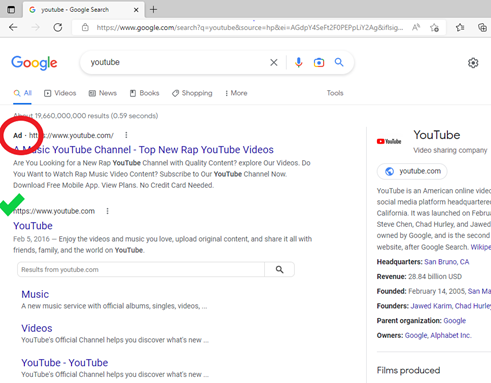
What is malvertising? Take for example the Google search results for “youtube” shown in the picture below. The top two results both appear to link to https://www.youtube.com. However, notice that the top result is labeled “ad” (circled in red). This result is an advertisement that may not take you to the URL you are expecting. The second result on the list is the real search result that will take you to YouTube’s website (green check mark). Google ads can be fraudulent and trick you into clicking an unsafe link and take you to a webpage you did not intend to visit.
This write-up from Malwarebytes provides additional information and pictures showing more examples of malvertising. Please review their examples of malvertising and use them to help improve your safe habits when reading emails, opening attachments, and clicking links.