New Employee Announcement
We are pleased to announce the addition of two support analysts, Amanda Baughman and Michelle Phillips, to the CBS Family as of August 1.
Amanda has worked in customer service for 15 years from banking to software support and implementations. She earned three degrees from Franklin University in Accounting, Business Administration, and Forensic Accounting. She has supported and implemented the CAMS-ii software for six years where she gained a diverse knowledge in the CAMS-ii Environment. Amanda specializes in the Back Office and General Ledger/Accounting platforms. She’s from Columbus, Ohio, and she has a four-year-old daughter.
Michelle has worked in customer service for 19 years with roles that included banking, policy and procedural support, software support, and implementations. Before joining CBS, she had previously held roles as a Teller, Operations Supervisor, and Internal Support Desk at Huntington Bank. She had also supported and implemented the CAMS-ii software for four years with RCO before moving to an Implementations role at Cott Systems, a Land Record filing and Court Case management software system. She lives in the Westerville, Ohio area with her six-year-old daughter and nine-year-old son.
CAMS-ii Transfer Utility Change
There is a previously undocumented change to the CAMS-ii Transfer Utility.
Now, when you use the CAMS-ii Transfer Utility, the standard Save dialog appears.
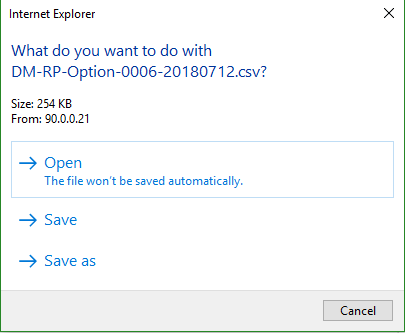
If you want the files from the CAMS-ii Transfer Utility to automatically download to the C:\cbs\camsxfer folder as before:
NOTE: The property may not appear unless you have already tried to transfer a file.
- Go to Back Office > Standard > Parameters > CAMS-ii System Properties.
- Scroll to the property, camsiitransferfolder_oldtransfermethod.
- Click the property to access the property screen.
- Change the Property Value to Yes.
- Click Accept.