Research Window Not Functioning Correctly
The Research Window is NOT functioning correctly, so please DO NOT use it. We are researching a fix to to this issue.
We will notify you when the Research Window in functioning correctly.
IMPORTANT: Make Available for Cash Drawers
A Make Available button is one of the new features included with the recent Cash Drawer changes.
It is designed to allow more than one Teller ID to have access to the same Teller Cash Drawer during the same day. The following graphic illustrates where the Make Available button resides.
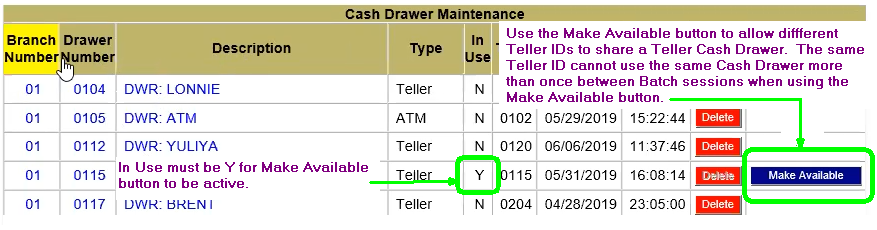
Once you click Make Available, the same Teller ID CANNOT use the same Cash Drawer again during that day. This is why an Override is required before you can complete the Make Available process.
The following scenario is an example of how to use Make Available:
SCENARIO: Teller ID 0213, using Cash Drawer 0105, stores and logs out from Cash Drawer 0105 for the day. Teller ID 0209 now needs to use Cash Drawer 0105; management goes to Back Office and clicks Make Available so Teller 209 can access Cash Drawer 0105.
IMPORTANT: Teller ID 0213 cannot log in to Cash Drawer 105 again until end-of-day batch is completed.
If you have questions about this message, please contact the CBS Support Center via CTT.